サンプル問題 1: An editor connects to an enterprise geodatabase to edit a feature class that uses traditional versioning. The editor uses the following workflow: • The Default version is set lo protected • A new child version is created from Default • The child version is set to protected • Edits are saved to the child version • The editor tries to reconcile and post to Default The reconcile is successful, but the post operation fails with an error. What should the editor do?
A: Change the access level of the child version from protected to public
B: Ask the owner of Default to perform the reconcile and post for the editor
C: Create a one-way replica from the child version and synchronize to Default
正解:B
Explanation: In traditional versioning within an enterprise geodatabase, the Default version often represents the published state of the database. Setting the Default version to protected ensures that while all users can view it, only the geodatabase administrator or the version owner can edit it directly or post changes to it. ArcGIS Pro In the scenario provided, the editor follows these steps: Default Version Set to Protected: This restricts editing and posting privileges to the geodatabase administrator or the version owner. Creation of a Child Version from Default: The editor creates a new version branching from Default. Child Version Set to Protected: This means only the editor (as the owner) or the geodatabase administrator can edit this child version. Edits Saved to the Child Version: The editor makes and saves changes within this child version. Attempt to Reconcile and Post to Default: The editor successfully reconciles but encounters an error during the post operation. The error during the post operation arises because, with the Default version set to protected, the editor lacks the necessary permissions to post changes directly to it. Only the geodatabase administrator or the owner of the Default version possesses the authority to perform this action. ArcGIS Pro Analysis of Options: Option A: Changing the access level of the child version from protected to public does not grant the editor the required permissions to post to the protected Default version. Option B: Requesting the owner of the Default version (typically the geodatabase administrator) to perform the reconcile and post is appropriate. This individual has the necessary permissions to post changes to the protected Default version. Option C: Creating a one-way replica and synchronizing is an unnecessary and complex approach for this situation. Therefore, the editor should ask the owner of Default to perform the reconcile and post to ensure the changes are integrated into the Default version
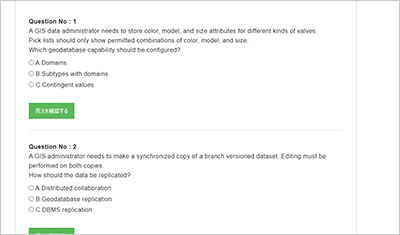
サンプル問題 2: A GIS administrator needs to facilitate the collaboration of two teams of GIS analysts in two different offices. Each office needs a copy of the data in its own enterprise geodatabase. and analysts in both offices will edit the same feature classes. Changes will be synchronized nightly. The GIS administrator needs to set up the information infrastructure so that both teams can work together. What should the administrator use to meet the requirements?
A: Geodatabase replication
B: Database replication
C: Distributed collaboration
正解:A
Explanation: To facilitate collaboration between two teams of GIS analysts located in different offices, each requiring a copy of the data in their own enterprise geodatabase with the ability to edit the same feature classes and synchronize changes nightly, geodatabase replication is the appropriate solution. Understanding Geodatabase Replication: Geodatabase replication is a data distribution method in ArcGIS that allows you to create copies of data across two or more geodatabases. This enables multiple users to work with the same datasets in different locations, with the ability to synchronize changes to ensure consistency. ARCGIS PRO Types of Geodatabase Replication: There are three types of geodatabase replication: One-Way Replication: Changes are sent in a single direction―from the parent to the child replica. Two-Way Replication: Changes are synchronized in both directions between the parent and child replicas. This is suitable when multiple editors need to update the same datasets in different locations. Checkout/Check-in Replication: Data is checked out to a child replica for editing and then checked back in to the parent replica. In this scenario, two-way replication is ideal, as it allows both teams to edit the same feature classes and synchronize changes nightly, ensuring that both geodatabases remain consistent. ARCGIS PRO Alternative Options: Database Replication: This refers to replicating entire databases at the DBMS level. While it can synchronize data, it doesn't account for the geodatabase-specific behaviors, rules, and relationships managed by ArcGIS. Therefore, it may not be suitable for scenarios requiring synchronization of geodatabase-specific functionalities. Distributed Collaboration: This is a framework in ArcGIS Enterprise that allows sharing of content, such as maps, layers, and apps, across multiple ArcGIS Enterprise deployments or between ArcGIS Enterprise and ArcGIS Online. However, it doesn't provide the fine-grained control over data editing and synchronization required in this scenario. GEODATABASE RESOURCES Therefore, to meet the requirements of both teams being able to edit the same feature classes in their respective enterprise geodatabases and synchronize changes nightly, geodatabase replication is the most appropriate solution.
サンプル問題 3: Slow performance is observed on a query of an indexed attribute on a large feature class in an enterprise geodatabase. • A SOL trace reveals that the attribute index is not being used in the query • The indexed attribute values have a high degree of uniqueness • The delta tables do not have very many rows Which tool should be used to resolve this issue?
A: Rebuild Indexes
B: Compress Geodatabase
C: Analyze Datasets
正解:A
Explanation: When experiencing slow performance on a query of an indexed attribute in a large feature class within an enterprise geodatabase, and a SQL trace reveals that the attribute index is not being utilized despite the attribute values having a high degree of uniqueness and the delta tables containing few rows, the appropriate action is to rebuild the indexes. Understanding Indexes in Enterprise Geodatabases: Indexes are critical for enhancing query performance in databases. They allow the database management system (DBMS) to locate and retrieve data efficiently. Over time, as data is inserted, updated, or deleted, indexes can become fragmented or outdated, leading to suboptimal query performance. ARCGIS PRO Rebuilding Indexes: The Rebuild Indexes tool in ArcGIS Pro is designed to rebuild existing attribute or spatial indexes in enterprise geodatabases. This process reorganizes the index structure, ensuring that the DBMS can effectively utilize the indexes during query execution. ARCGIS PRO Steps to Rebuild Indexes: Access the Rebuild Indexes Tool: In ArcGIS Pro, navigate to the Analysis tab and click on Tools. In the Geoprocessing pane, search for and select the Rebuild Indexes tool. Configure the Tool Parameters: Input Database Connection: Specify the connection to your enterprise geodatabase. Include System Tables: Decide whether to include system tables in the rebuild process. Including system tables can help maintain the overall health of the geodatabase but may increase processing time. Execute the Tool: Click Run to initiate the index rebuilding process. Monitor the progress and ensure the process completes without errors. Alternative Options: Compress Geodatabase: The Compress operation reduces the size of the geodatabase by removing redundant states and versions. While it can improve performance, it doesn't directly address index fragmentation. Analyze Datasets: The Analyze Datasets tool updates database statistics, which helps the DBMS optimize query execution plans. However, if indexes are fragmented, analyzing datasets alone may not resolve performance issues. Given the symptoms described―specifically, the attribute index not being used in queries―the most effective solution is to rebuild the indexes to ensure they are properly structured and utilized by the DBMS during query execution.
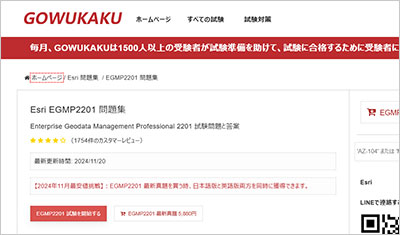
GOWUKAKUのEGMP2201問題集は、Esri Enterprise Geodata Management Professional 2201認定試験の準備に向けた復習用問題集です。EGMP2201問題集を使用して出題形式を確認し、知識の定着度を確認しながら復習を進めることができます。