

毎月、GOWUKAKUは1500人以上の受験者が試験準備を助けて、試験に合格するために受験者にご協力します
Supporting Cisco Devices for Field Technicians (FLDTEC) 試験
最新更新時間: 2026/09/21
【秋学習応援セール|10月限定キャンペーン】:800-150 最新真題を買う時、日本語版と英語版両方を同時に獲得できます。
実際の問題集を練習し、試験のポイントを了解し、テストに申し込むするかどうかを決めることができます。
さらに試験準備時間の35%を節約するには、800-150 問題集を使用してください。
Question No : 1
Which type of license is locally managed and does not require external tools for management?
正解:
Explanation:
Right-To-Use (RTU) licenses are locally managed licenses that allow users to activate specific features on Cisco devices without the need for external tools or connectivity to Cisco's licensing infrastructure. These licenses operate on an honor-based system, where the user agrees to comply with the licensing terms without mandatory enforcement mechanisms.
In contrast:
Hybrid licenses combine aspects of traditional and smart licensing models.
PAK (Product Authorization Key) licenses require registration and activation through Cisco's licensing portal.
Smart licenses necessitate communication with Cisco's Smart Licensing servers for activation and management.
Reference: Supporting Cisco Devices for Field Technicians (FLDTEC) C Cisco Licensing and Smart Licensing
Question No : 2
Which command provides a concise look at important switch port characteristics, such as port ID, VLAN, duplex, speed, and media type?
正解:
Explanation:
The show interface status command offers a succinct overview of switch port characteristics, including:
Port ID
VLAN assignment
Duplex mode
Speed
Media type
This command is particularly useful for quickly assessing the operational status and configuration of switch ports, aiding in troubleshooting and verification tasks.
In contrast:
show cdp neighbors displays information about directly connected Cisco devices.
show controllers provides low-level hardware information.
show ip interface brief offers a summary of IP-related interface information.
Reference: Supporting Cisco Devices for Field Technicians (FLDTEC) C Device Configuration and
Verification
Question No : 3
Which action must be taken when editing a captured configuration of an old device for reuse in a replacement device?
正解:
Explanation:
Within the FLDTEC training, especially under Maintenance and RMA Procedures, there is a strong emphasis on safely transferring and adapting configurations from failed or decommissioned devices to replacement units.
The official guidance includes the following:
"When reusing a configuration from an old device, make sure to retain the necessary security elements such as username entries. This ensures the replacement device is still accessible under the correct user credentials."
Here's a breakdown of why the correct answer is B:
A. Remove all configurations under line vty 0 4: ❌ This would eliminate remote access settings, making it harder to manage the device.
B. Retain all username entries: ✅ Correct. Keeping the username entries ensures continued secure access and avoids loss of administrative control.
C. Keep all access-list commands intact: ❌ Not always required ― ACLs are often tailored to interface-specific settings or environments which may differ between devices.
D. Add the enable password cisco command: ❌ Not a best practice. Default passwords (like cisco) should be avoided for security reasons, and it's not required if enable secret is already in use.
Question No : 4
Which two actions are typically performed in ROMMON mode during the password recovery process? (Choose two.)
正解:
Explanation:
During the password recovery process on Cisco devices, ROMMON (ROM Monitor) mode is utilized to perform specific actions that facilitate the recovery.
Two critical actions typically performed in ROMMON mode are:
Change the Configuration Register: The configuration register is modified to instruct the device to ignore the startup configuration during the next boot. This is commonly achieved by setting the configuration register to 0x2142. This action prevents the device from loading the saved configuration, allowing access without requiring the existing passwords.
Reboot the Device: After changing the configuration register, the device is rebooted to apply the new settings. This reboot enables the device to bypass the startup configuration, facilitating the password recovery process.
These steps are essential in the password recovery procedure, allowing administrators to regain access to the device without erasing the existing configuration.
Reference: Supporting Cisco Devices for Field Technicians (FLDTEC) C Troubleshooting Methodologies
Question No : 5
Which command is used to copy the startup configuration of a device to a USB file system when transferring files to a Cisco device?
正解:
Explanation:
To back up the startup configuration of a Cisco device to a USB drive, the command copy startup-config usbflash0:
[filename] is used. This command copies the contents of the startup configuration file stored in NVRAM to a specified file on the USB flash drive. This is particularly useful for creating backups before performing upgrades or replacements.Option A: Copies the startup configuration to a TFTP server, not a USB drive.
Option B: Attempts to copy from the USB drive to the startup configuration, which is the reverse of the desired operation.
Option D: Copies the running configuration, not the startup configuration, to the USB drive.
Reference: Supporting Cisco Devices for Field Technicians (FLDTEC) C Maintenance and RMA Procedures
Question No : 6
Which mode must the console terminal of the device be in before a prewritten configuration is pasted to transfer the configuration from an old device to a new one?
正解:
Explanation:
To apply a prewritten configuration to a new Cisco device, the console terminal must be in Global Configuration Mode. This mode allows administrators to enter configuration commands that affect the device's overall operation. To access Global Configuration Mode, one must first enter Privileged EXEC Mode by typing enable, and then enter configure terminal. Once in Global Configuration Mode, the prewritten configuration can be pasted, and the device will accept the commands accordingly.
Reference: Supporting Cisco Devices for Field Technicians (FLDTEC) C Device Configuration and Verification
Question No : 7
DRAG DROP
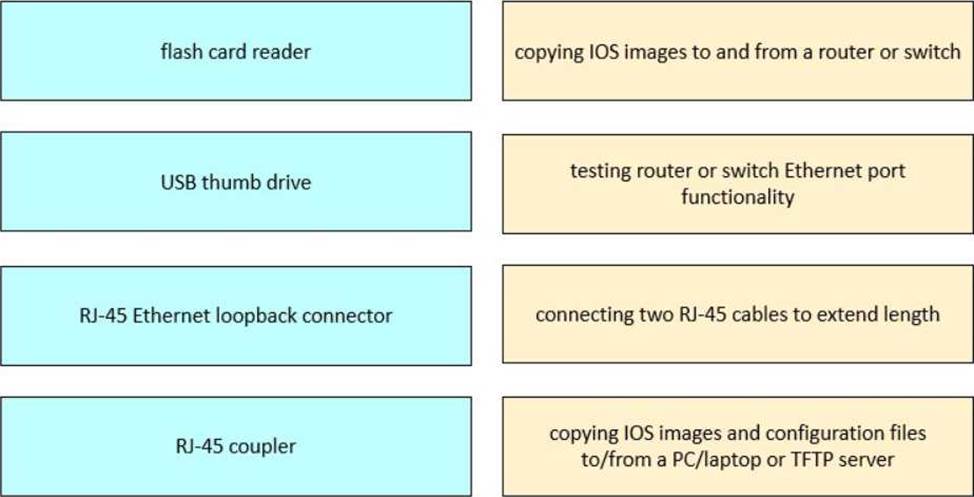
Drag and drop the tools from the left onto the corresponding primary functions on the right.
正解: 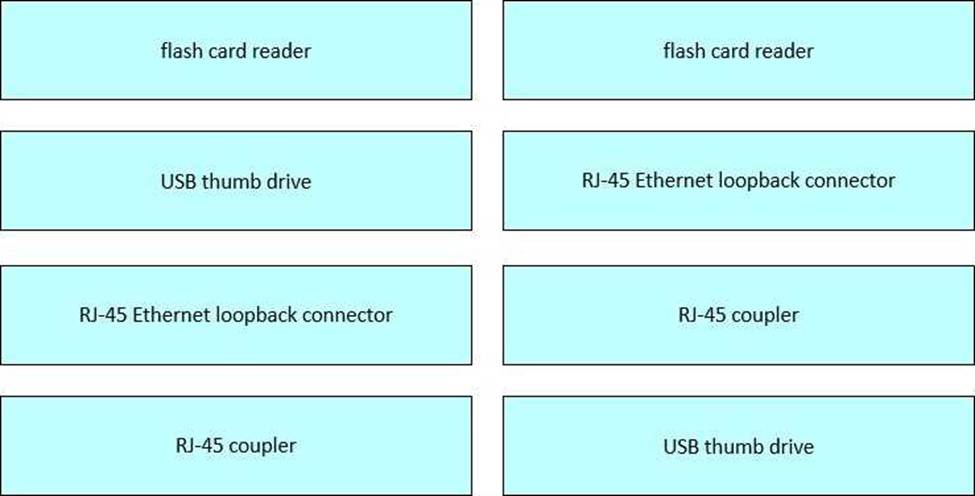
Explanation:
In the FLDTEC curriculum, technicians are trained on physical tools essential for support in the field.
These tools and their uses are explained as follows:
Flash Card Reader: Used with removable CompactFlash cards commonly found in older Cisco routers and switches. These cards hold the IOS image or config files.
USB Thumb Drive: Used for transferring IOS files or configs directly to and from Cisco devices that support USB storage. Convenient for portable backups.
RJ-45 Ethernet Loopback Connector: A diagnostic tool that loops the signal back into the port. Helps verify port functionality by simulating a live Ethernet connection.
RJ-45 Coupler: Allows two patch cables to be connected, effectively extending the reach of a cable ― useful in setups where a single cable is not long enough.
Question No : 8
Which command prompt commands provide the most thorough network diagnostic information when troubleshooting connectivity issues between a Windows PC and a Cisco device?
正解:
Explanation:
When diagnosing network connectivity issues between a Windows PC and a Cisco device, the combination of ipconfig /all and ping commands provides comprehensive information:
ipconfig /all: Displays detailed IP configuration information, including IP addresses, subnet masks,
default gateways, DNS servers, and MAC addresses for all network adapters. This information is
crucial for verifying correct network settings.
ping: Tests the reachability of a host on an IP network and measures the round-trip time for messages sent from the originating host to a destination computer. It's a fundamental tool for checking connectivity between devices.
While other commands like netstat, tracert, nslookup, arp -a, and route print provide valuable information, ipconfig /all and ping are typically the first and most informative commands used in initial troubleshooting steps.
Reference: Supporting Cisco Devices for Field Technicians (FLDTEC) C Troubleshooting Methodologies
Question No : 9
What is the primary purpose of changing the configuration register when performing password recovery?
正解:
Explanation:
During password recovery on Cisco devices, the configuration register is modified to instruct the device to bypass the startup configuration stored in NVRAM. This allows administrators to access the device without being prompted for existing passwords. The standard procedure involves changing the configuration register value to 0x2142, which tells the device to ignore the startup configuration during the next boot. Once access is gained, the administrator can reset passwords and then restore the original configuration by resetting the configuration register to its default value, typically 0x2102.
Reference: Supporting Cisco Devices for Field Technicians (FLDTEC) C Troubleshooting Methodologies
Question No : 10
DRAG DROP
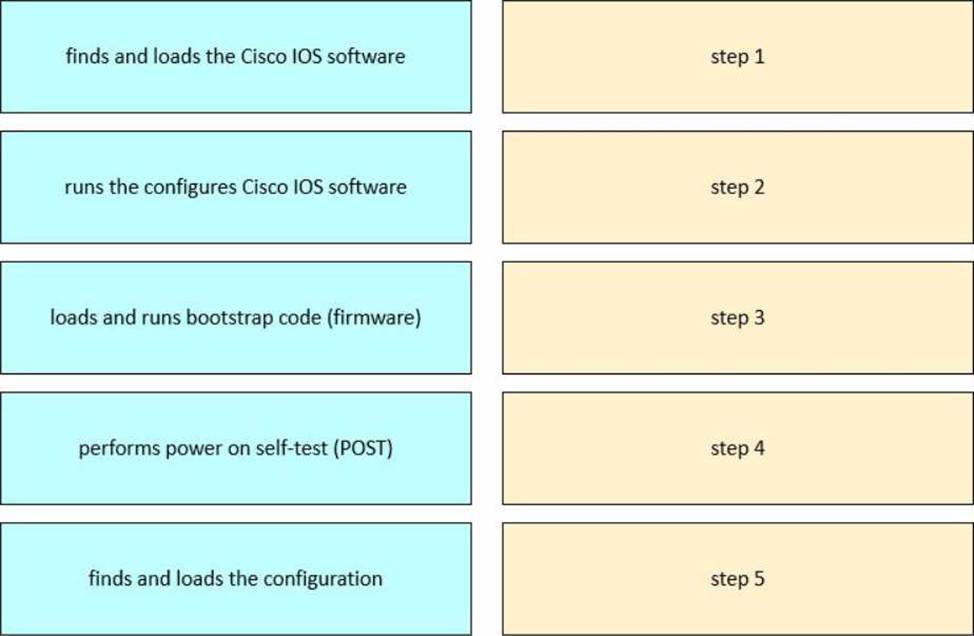
Drag and drop the steps of the boot sequence process of a Cisco device into order on the right.
正解: 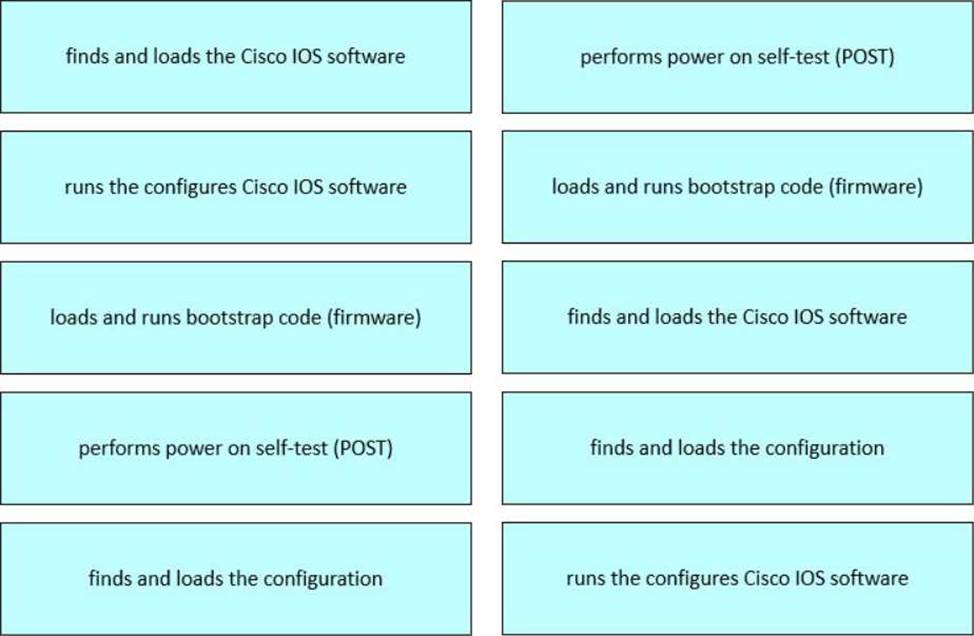
Explanation:
Step 1 → Performs power-on self-test (POST)
Step 2 → Loads and runs bootstrap code (firmware)
Step 3 → Finds and loads the Cisco IOS software
Step 4 → Finds and loads the configuration
Step 5 → Runs the configured Cisco IOS software
This startup process is thoroughly described in the FLDTEC course and aligns with Cisco's standard IOS boot process:
POST (Power-On Self-Test): Verifies hardware functionality including memory and interfaces. This occurs immediately upon powering the device.
Bootstrap Code Execution: Bootstrap is a small program in ROM that initiates the boot process.
Cisco IOS Loading: Bootstrap locates and loads the IOS from flash memory or another source (e.g., TFTP).
Configuration Loading: The router then loads the startup-config from NVRAM (if available).
IOS Execution: Once the configuration is loaded, the device enters operational mode and executes the IOS with the loaded config.
This sequence is vital for field technicians to understand for troubleshooting boot failures or performing device recoveries.
Question No : 11
Which two settings are standard Cisco console connections when configuring a terminal emulator to connect to the console port of a Cisco switch? (Choose two.)
正解:
Explanation:
When configuring a terminal emulator (such as PuTTY, Tera Term, or HyperTerminal) to connect to the console port of a Cisco switch, the standard settings are as follows: Speed (baud rate): 9600
This is the default transmission speed for Cisco console ports, ensuring compatibility across various devices.
Data bits: 8
This setting specifies that each character transmitted consists of 8 data bits, which is standard for most serial communications.
Parity: None
No parity bit is used, meaning there is no additional error-checking bit appended to each character. Wikipedia
Stop bits: 1
One stop bit indicates the end of a character transmission. Flow control: None
No flow control is employed, allowing continuous data transmission without hardware or software-based pausing.
Therefore, options C (Speed: 9600) and D (Data bits: 8) are correct. Options A (Stop bits: 2), B (Flow control: Hardware), and E (Parity: Even) deviate from the standard settings and may result in communication issues if configured.
Reference: Supporting Cisco Devices for Field Technicians (FLDTEC) C Device Configuration and Verification
Question No : 12
DRAG DROP
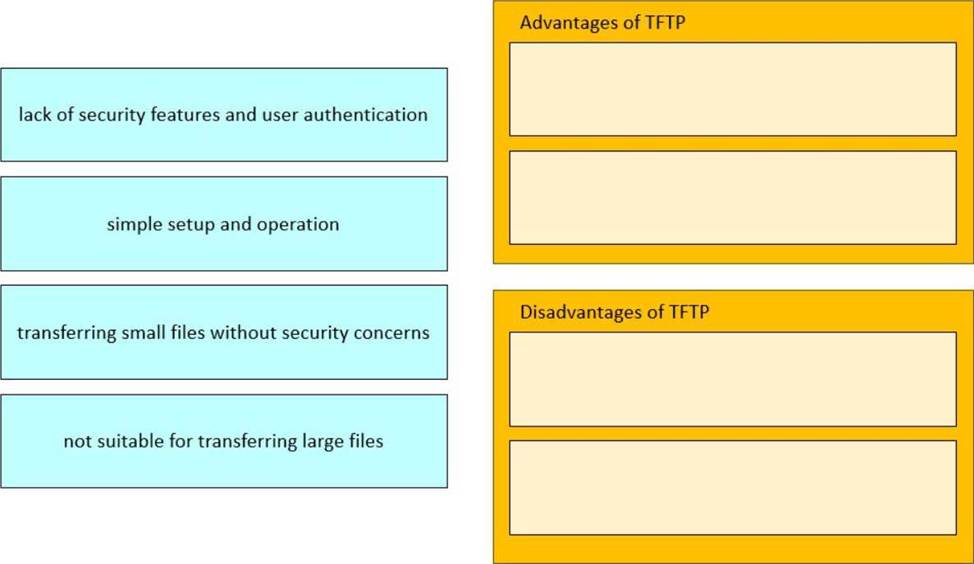
Drag and drop the TFTP statements from the left onto the corresponding categories on the right.
正解: 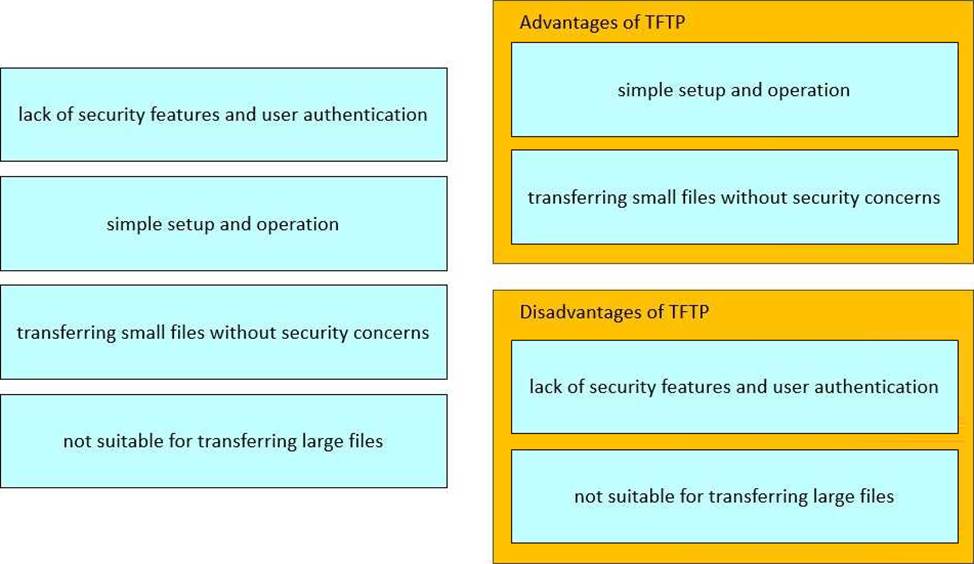
Explanation:
The FLDTEC course teaches that TFTP is a lightweight file transfer protocol often used in Cisco devices for transferring configuration files or IOS images, especially in environments where simplicity is more critical than security:
Advantages:
It has a lightweight footprint, making it easy to use and configure.
Useful for transferring small files such as backup configs or small IOS images.
Disadvantages:
Lacks encryption and does not support authentication, making it insecure for sensitive or production environments.
Not efficient for large file transfers due to its limited feature set and reliance on UDP (User Datagram Protocol).
This makes TFTP a good fit for trusted internal networks where simplicity is preferred over robust security.
Question No : 13
DRAG DROP

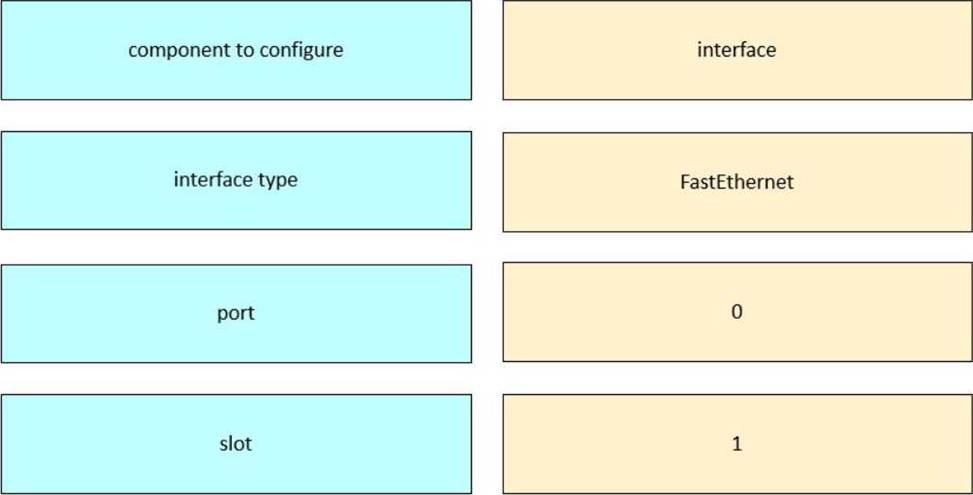
Drag and drop the command names from the left onto the corresponding elements in the interface configuration mode command structure on the right.
正解: 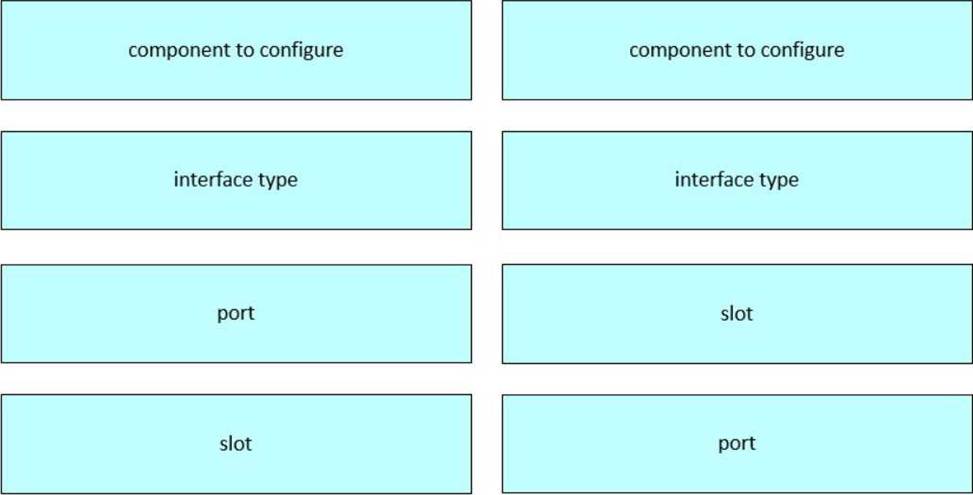
Explanation:
Component to configure → interface
Interface type → FastEthernet
Port → 1
Slot → 0
This command structure is part of the Device Configuration and Verification section in the FLDTEC course. It teaches how to navigate and configure interfaces on Cisco devices using the IOS CLI: interface is the global configuration mode command to begin configuring a network interface. FastEthernet specifies the type of interface (could also be GigabitEthernet, Serial, etc.). 0/1 represents the slot/port structure used on Cisco devices:
The first digit (before the slash) is the slot number.
The second digit (after the slash) is the port number within that slot.
This structure allows Cisco to modularly address interfaces, especially in devices with multiple slots or module-based configurations.
Question No : 14
DRAG DROP
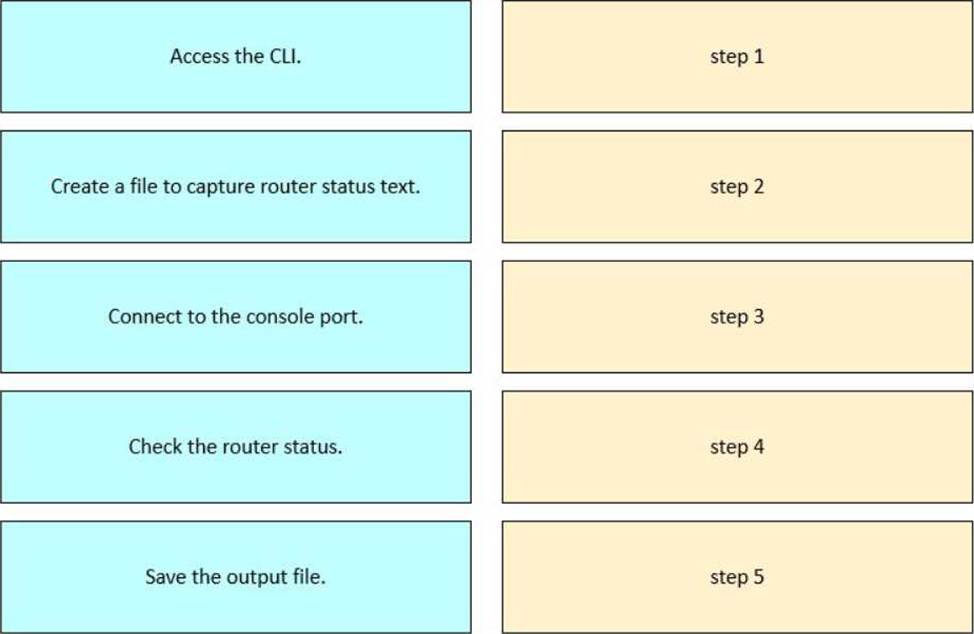
Drag and drop the steps from the left into order to capture the status of a Cisco device.
正解: 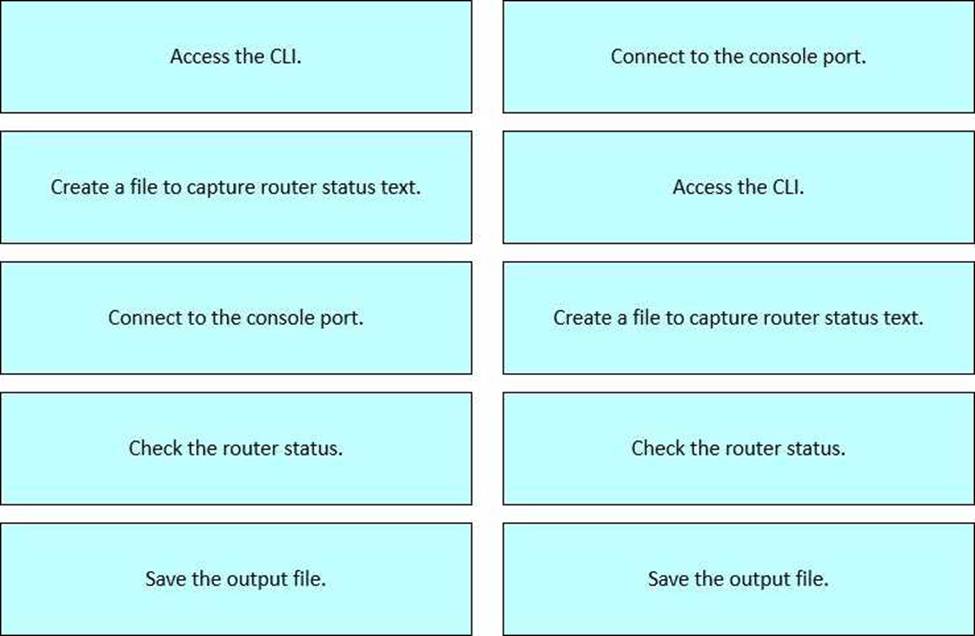
Explanation:
This procedure is taught in the FLDTEC course under the Device Configuration and Verification section and reflects standard field technician workflows:
Connect to the console port using a console cable and terminal software (like PuTTY or Tera Term).
Access the CLI of the Cisco device by logging in via the console session.
Create a log file or enable logging in the terminal emulator to begin capturing output.
Check the router status using commands such as show running-config, show ip interface brief, or show version.
Save the output file from the terminal emulator for documentation, troubleshooting, or escalation.
This logical flow ensures accurate diagnostics and traceability during field support operations.
Question No : 15
What is the primary purpose of backing up the endpoint configuration prior to replacing the device?
正解:
Explanation:
Backing up the configuration of a network device before replacement is a critical step to ensure business continuity and minimize downtime. The primary purpose of this backup is to restore the existing settings onto the new device, ensuring that it operates identically to the one being replaced. This process includes preserving interface configurations, routing protocols, access control lists, and other essential parameters. By restoring the backed-up configuration to the new device, network administrators can quickly reintegrate it into the network infrastructure without the need for manual reconfiguration, thereby reducing the risk of errors and service disruptions.
Options A, B, and C do not align with the primary objective of configuration backups in the context of device replacement.
Reference: Supporting Cisco Devices for Field Technicians (FLDTEC) C Maintenance and RMA Procedures