

毎月、GOWUKAKUは1500人以上の受験者が試験準備を助けて、試験に合格するために受験者にご協力します
Securing Email with Cisco Email Security Appliance (SESA) 試験
最新更新時間: 2026/09/21
【秋学習応援セール|10月限定キャンペーン】:300-720 最新真題を買う時、日本語版と英語版両方を同時に獲得できます。
実際の問題集を練習し、試験のポイントを了解し、テストに申し込むするかどうかを決めることができます。
さらに試験準備時間の35%を節約するには、300-720 問題集を使用してください。
Question No : 1
A Cisco ESA administrator was notified that a user was not receiving emails from a specific domain.
After reviewing the mail logs, the sender had a negative sender-based reputation score.
What should the administrator do to allow inbound email from that specific domain?
正解:
Explanation:
The allow list is a feature that allows Cisco ESA to accept messages from specific email addresses or domains, regardless of their sender-based reputation score or other reputation filters.
To allow inbound email from that specific domain, the administrator should add the domain into the allow list on Cisco ESA, which can be done from the web user interface by selecting Security Services > Safelist/Blocklist and clicking Add Entry.
The other options are not valid solutions to allow inbound email from that specific domain, because they do not affect the sender-based reputation score or the reputation filters on Cisco ESA.
Reference: User Guide for AsyncOS 15.0 for Cisco Secure Email Gateway, page 6-13 and page 6-14.
Question No : 2
Which method enables an engineer to deliver a flagged message to a specific virtual gateway address in the most flexible way?
正解:
Explanation:
A filter is a method that enables an engineer to deliver a flagged message to a specific virtual gateway address in the most flexible way. A filter is a rule that allows Cisco ESA to perform actions on messages based on predefined or custom conditions, such as headers, envelope, body, attachments, etc.
To deliver a flagged message to a specific virtual gateway address using a filter, the engineer can create a content filter or message filter that matches the flag condition and applies an action of “deliver via alternate host” with the virtual gateway address as the parameter.
The other options are not methods that enable an engineer to deliver a flagged message to a specific virtual gateway address in the most flexible way, because they have more limitations or requirements than using a filter.
Reference: User Guide for AsyncOS 15.0 for Cisco Secure Email Gateway, page 8-3 and page 8-7.
Question No : 3
Refer to the exhibit.
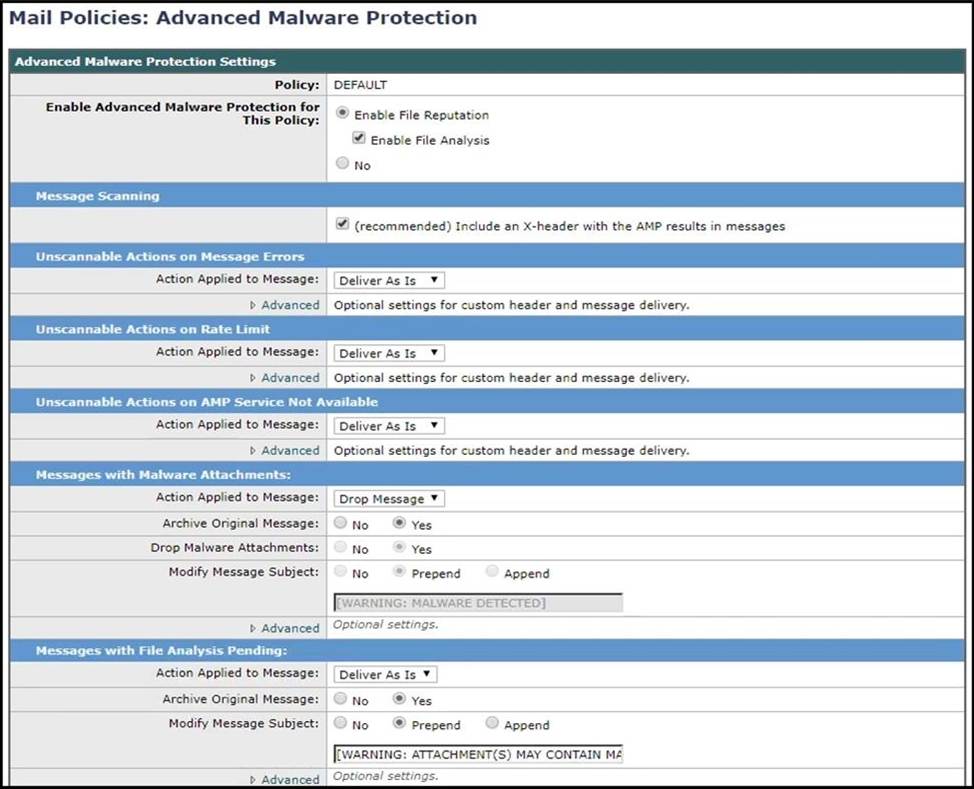
How should this configuration be modified to stop delivering Zero Day malware attacks?
正解:
Explanation:
Overview of File Reputation Filtering and File Analysis:
Advanced Malware Protection protects against zero-day and targeted file-based threats in email attachments by:
-Obtaining the reputation of known files.
-Analyzing behavior of certain files that are not yet known to the reputation service.
-Continuously evaluating emerging threats as new information becomes available, and notifying you about files that are determined to be threats after they have entered your network.
-This feature is available for incoming messages and outgoing messages.
https://www.cisco.com/c/en/us/td/docs/security/esa/esa11-1/user_guide/b_ESA_Admin_Guide_11_1/b_ESA_Admin_Guide_chapter_010000.html?bookSearch =true
Question No : 4
Refer to the exhibit.
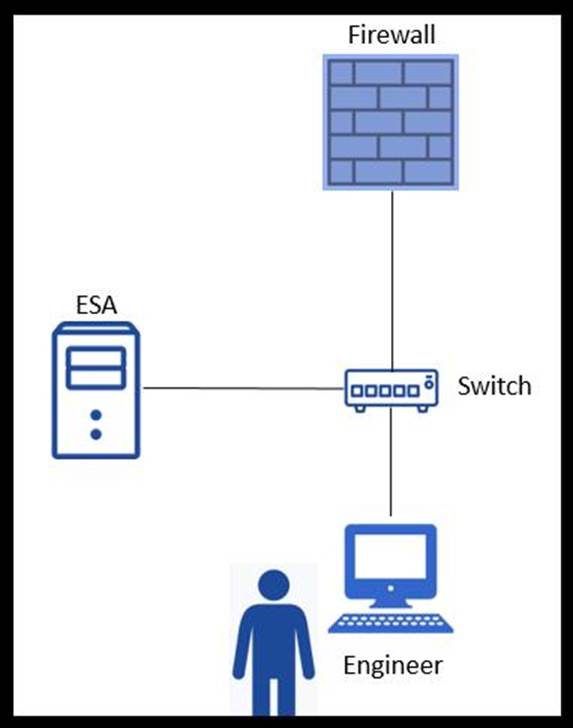
An engineer is trying to connect to a Cisco ESA using SSH and has been unsuccessful. Upon further inspection, the engineer notices that there is a loss of connectivity to the neighboring switch.
Which connection method should be used to determine the configuration issue?
正解:
Explanation:
Serial connection is a method that should be used to determine the configuration issue when there is a loss of connectivity to the neighboring switch. Serial connection allows the engineer to access the Cisco ESA console port using a serial cable and a terminal emulator, such as PuTTY or HyperTerminal, without relying on the network connectivity.
The other options are not valid methods to determine the configuration issue when there is a loss of connectivity to the neighboring switch, because they require network connectivity to work.
Reference: Cisco Email Security Appliance C690 Quickstart Guide, page 2.
Question No : 5
An engineer is testing mail flow on a new Cisco ESA and notices that messages for domain abc.com are stuck in the delivery queue. Upon further investigation, the engineer notices that the messages pending delivery are destined for 192.168.1.11, when they should instead be routed to 192.168.1.10.
What configuration change needed to address this issue?
正解:
Explanation:
Reference: https://www.cisco.com/c/en/us/support/docs/security/email-security-appliance/118136-qanda-esa-00.html
You can use the SMTP route feature on Cisco ESA to specify how messages for a specific domain are routed to their destination. You can modify the SMTP route for the domain abc.com and change the IP address to 192.168.1.10 to ensure that messages are delivered correctly3.
Reference = Securing Email with Cisco Email Security Appliance (SESA) v3.1
Question No : 6
An administrator identifies that, over the past week, the Cisco ESA is receiving many emails from certain senders and domains which are being consistently quarantined. The administrator wants to ensure that these senders and domain are unable to send anymore emails.
Which feature on Cisco ESA should be used to achieve this?
正解:
Explanation:
The appliance enforces your organization’s policies for messages sent to and from your users through the use of mail policies. These are sets of rules that specify the types of suspect, sensitive, or malicious content that your organization may not want entering or leaving your network.
This content may include:
-spam
-legitimate marketing messages
-graymail
-viruses
-phishing and other targeted mail attacks
-confidential corporate data
-personally identifiable information
https://www.cisco.com/c/en/us/td/docs/security/esa/esa11-1/user_guide/b_ESA_Admin_Guide_11_1/b_ESA_Admin_Guide_chapter_01001.html?bookSearch=t rue
Question No : 7
A Cisco ESA administrator has several mail policies configured. While testing policy match using a specific sender, the email was not matching the expected policy.
What is the reason of this?
正解:
Explanation:
The envelope sender and the envelope recipeint have a higher priority over the sender header when you match a message to a mail policy. If you configure a mail policy to match a specific user, the messages are automatically classified into the mail policy based on the envelope sender and the envelope recipient. https://www.cisco.com/c/en/us/td/docs/security/esa/esa11-1/user_guide/b_ESA_Admin_Guide_11_1/b_ESA_Admin_Guide_chapter_01001.html
Question No : 8
An administrator is managing multiple Cisco ESA devices and wants to view the quarantine emails from all devices in a central location.
How is this accomplished?
正解:
Explanation:
Disabling the Local Spam Quarantine to Activate the External Quarantine If you were using a local
spam quarantine before enabling an external spam quarantine, you must disable the local
quarantine in order to send messages to the external quarantine.
https://www.cisco.com/c/en/us/td/docs/security/esa/esa11-1/user_guide/b_ESA_Admin_Guide_11_1/b_ESA_Admin_Guide_chapter_0101010.html?bookSearch=true#con_1172419
Question No : 9
To comply with a recent audit, an engineer must configure anti-virus message handling options on the incoming mail policies to attach warnings to the subject of an email.
What should be configured to meet this requirement for known viral emails?
正解:
Explanation:
Message Handling Settings:
Repaired Message Handling
Messages are considered repaired if the message was completely scanned and all viruses have been repaired or removed. These messages will be delivered as is.
Encrypted Message Handling
Messages are considered encrypted if the engine is unable to finish the scan due to an encrypted or protected field in the message. Messages that are marked encrypted may also be repaired.
Unscannable Message Handling
Messages are considered unscannable if a scanning timeout value has been reached, or the engine becomes unavailable due to an internal error. Messages that are marked unscannable may also be repaired.
Virus Infected Message Handling
The system may be unable to drop the attachment or completely repair a message. In these cases, you can configure how the system handles messages that could still contain viruses.
https://www.cisco.com/c/en/us/td/docs/security/esa/esa12-0/user_guide/b_ESA_Admin_Guide_12_0/b_ESA_Admin_Guide_chapter_01011.html#con_1132282
Question No : 10
A network administrator is modifying an outgoing mail policy to enable domain protection for the organization. A DNS entry is created that has the public key.
Which two headers will be used as matching criteria in the outgoing mail policy? (Choose two.)
正解:
Explanation:
To enable domain protection for the organization, the administrator must configure an outgoing mail policy that matches the sender and the from headers of the email. The sender header is the envelope sender address that is used by SMTP to route the email. The from header is the address that is displayed to the recipient as the source of the email. These headers are used to generate and verify a DomainKeys Identified Mail (DKIM) signature, which is a cryptographic method of validating the authenticity and integrity of an email message.
The other headers are not relevant for domain protection. The message-ID header is a unique identifier for each email message. The URL reputation header is a score that indicates the likelihood of a URL being malicious. The mail-from header is an alias for the sender header.
Reference: Domain Protection
DKIM Signing
Question No : 11
What are two primary components of content filters? (Choose two.)
正解:
Explanation:
Content filters are rules that allow Cisco ESA to perform actions on messages based on predefined or custom conditions, such as headers, envelope, body, attachments, etc.
The two primary components of content filters are:
Conditions, which are the criteria that determine whether a message matches a content filter rule or not, such as message size, sender address, attachment type, etc.
Actions, which are the operations that Cisco ESA performs on a message if it matches the conditions of a content filter rule, such as deliver, drop, quarantine, encrypt, etc.
The other options are not primary components of content filters on Cisco ESA.
Reference: User Guide for AsyncOS 15.0 for Cisco Secure Email Gateway, page 8-3 and page 8-4.
Reference: https://www.cisco.com/c/en/us/td/docs/security/ces/user_guide/esa_user_guide_11-1/b_ESA_Admin_Guide_ces_11_1/b_ESA_Admin_Guide_chapter_01010.pdf
Question No : 12
Which scenario prevents a message from being sent to the quarantine as an action in the scan behavior on Cisco ESA?
正解:
Explanation:
A policy quarantine is a type of quarantine that allows Cisco ESA to store messages that match certain criteria, such as virus, spam, or DLP verdicts, for further review or release by an administrator
or an end user.
A scenario that prevents a message from being sent to the quarantine as an action in the scan behavior on Cisco ESA is when a policy quarantine is missing, which means that no policy quarantine has been created or enabled on Cisco ESA.
The other options do not prevent a message from being sent to the quarantine as an action in the scan behavior on Cisco ESA.
Reference: User Guide for AsyncOS 15.0 for Cisco Secure Email Gateway, page 10-2 and page 10-3.
Question No : 13
Which action on the Cisco ESA provides direct access to view the safelist/blocklist?
正解:
Explanation:
The safelist/blocklist (SLBL) is a feature that allows Cisco ESA to accept or reject messages from specific email addresses or domains, based on the configuration of mail flow policies or end user preferences.
The action that provides direct access to view the SLBL on Cisco ESA is to export the SLBL to a .csv file, which can be done from the web user interface by selecting Security Services > Safelist/Blocklist and clicking Export.
The other options do not provide direct access to view the SLBL on Cisco ESA.
Reference: User Guide for AsyncOS 15.0 for Cisco Secure Email Gateway, page 6-13 and page 6-14.
Reference: https://www.cisco.com/c/en/us/support/docs/security/email-security-appliance/117922-technote-esa-00.html
Question No : 14
Which global setting is configured under Cisco ESA Scan Behavior?
正解:
Explanation:
The global setting that is configured under Cisco ESA Scan Behavior is the actions for unscannable messages due to attachment type. This setting allows the administrator to specify what action to take when a message contains an attachment that cannot be scanned by the appliance, such as encrypted or password-protected files.
The possible actions are:
Deliver -Deliver the message normally.
Drop -Drop the message silently without notifying the sender or recipient.
Quarantine -Quarantine the message in a specified policy quarantine.
Bounce -Bounce the message back to the sender with a specified reason.
Reference: Scan Behavior
Reference: https://community.cisco.com/t5/email-security/cisco-ironport-esa-security-services-scan-behavior-impact-on-av/td-p/3923243
Question No : 15
When the Cisco ESA is configured to perform antivirus scanning, what is the default timeout value?
正解:
Explanation:
When Cisco ESA is configured to perform antivirus scanning, the default timeout value is 60 seconds, which means that Cisco ESA will wait for 60 seconds for the antivirus engine to scan a message before applying the configured action for unscannable messages, such as deliver, drop, or quarantine.
Reference: User Guide for AsyncOS 15.0 for Cisco Secure Email Gateway, page 7-3.
Reference: https://www.cisco.com/c/en/us/td/docs/security/esa/esa12-0/user_guide/b_ESA_Admin_Guide_12_0/b_ESA_Admin_Guide_chapter_01011.html